

Schools and kura have a lot to manage when online threats appear, especially when those threats are designed to cause disruption or concern.
It’s becoming common for hoax threats to be sent to New Zealand schools via email – such as the recent hoax bomb threat emails. When something like this happens, it’s natural to ask whether email security tools should block these messages before they reach a school inbox.
The answer is a little more nuanced than a simple yes or no… And in some cases, like when these hoax bomb emails were blocked, the school wants to know why they were blocked and not let through.
N4L’s Email Protection service helps protect schools and kura from many email-based threats, including phishing, scams, ransomware and advanced malware. However, our security systems are not configured to intentionally block threatening emails sent to schools. If an email containing threatening language is blocked, it’s because of who sent it or how it was sent.
Email filtering happens in layers
When an email is sent to a school, it passes through several layers of filtering before it reaches an inbox. For schools using Email Protection, incoming emails are first checked by our service. It looks for signs that an email may be malicious, suspicious or unwanted, such as whether it comes from an untrusted IP address or sending service.
After that, the email is passed on to the school’s Microsoft or Google email system. These platforms also apply their own spam and security rules before delivering the email to an inbox, Spam folder or quarantine area. The infographic below helps to explain how the different layers of email filtering work, using the example of a bomb threat email:
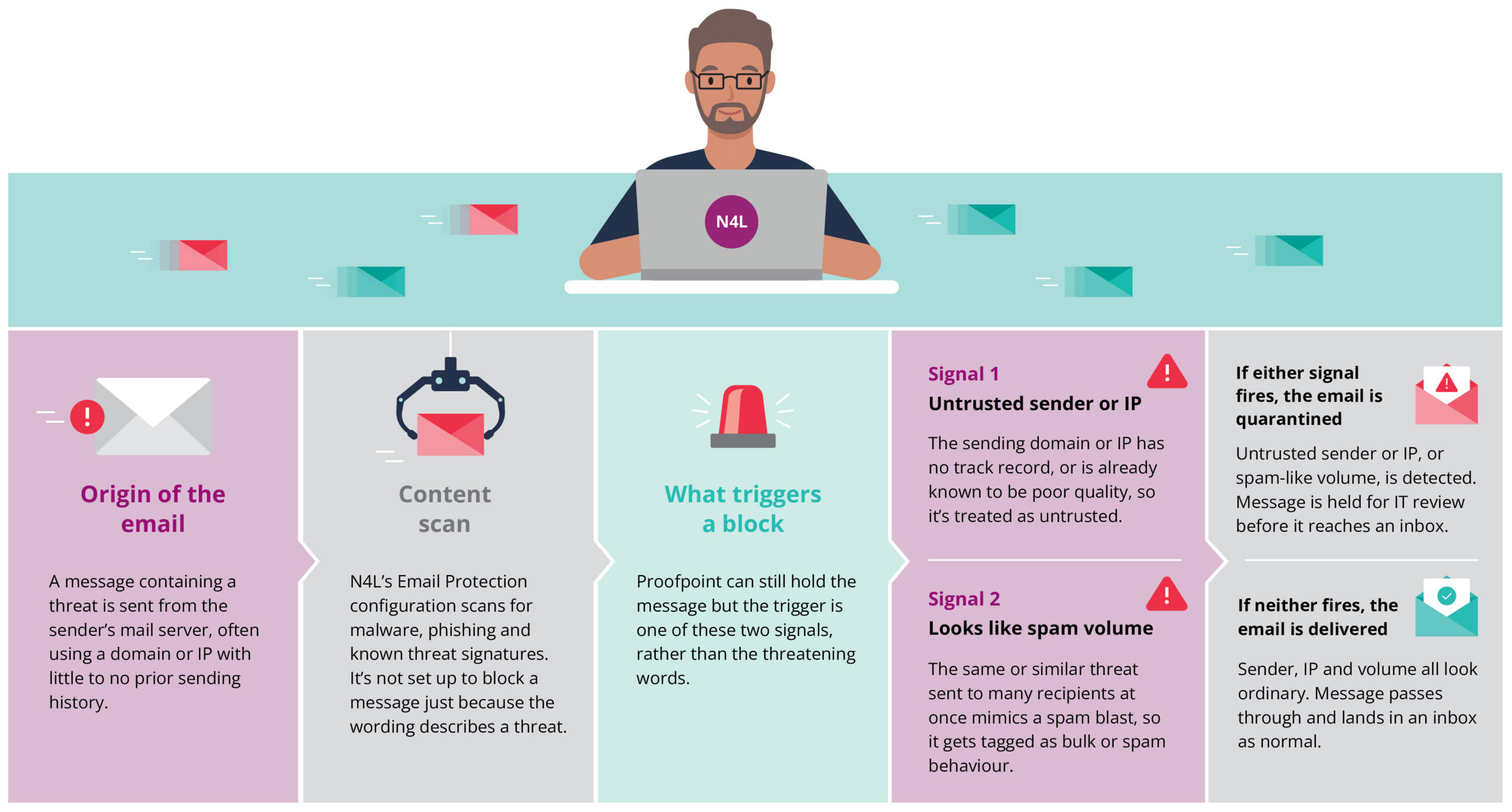
It’s worth noting that different signals are used for different kinds of threats, not just the two included here. It’s also good to remember that N4L does not control or have visibility over the filtering decisions made by Microsoft or Google.
Why some emails may be blocked and others may get through
N4L’s Email Protection setup does not treat threatening wording as grounds to block an email. A message only gets held back when the sender or IP is untrusted, or when the volume of messages looks like a spam blast. Schools should not assume threat content alone will be caught, and need a clear process for any threat email that does land in an inbox.
If a threatening email is sent in bulk to many schools, email filtering systems are more likely to detect patterns and respond. For example, N4L’s Email Protection may recognise that the emails are coming from untrusted sources and begin blocking them in the same way it would for spam or other suspicious email activity.
Microsoft or Google may also detect the emails as spam based on their own rules.
However, email filtering systems are dynamic. If a single threatening email is sent to a single school, it’s more likely to be delivered. Sometimes an email may get through before a filter has enough information to recognise the pattern and start blocking similar messages. This is why some schools receive the email and others don’t. The system may need to see hundreds of the same email before it recognises a bulk spam sender and begins blocking these threatening emails.
This is where our Email Protection service has an advantage. Its visibility across thousands of protected users allows it to detect emerging threats sooner and respond at scale, helping reduce the likelihood of the same threat reaching other schools.
Where to check for blocked emails
If your school uses our Email Protection service and an email has been blocked, it may be sitting in quarantine. Schools can use the Email Protection tool in MyN4L to view quarantined emails and release any legitimate messages.
If an email has been blocked by Microsoft or Google, it may be in the account’s Spam folder. It’s worth regularly checking Spam folders for key school accounts, such as office, admin or principal email addresses, especially during an active incident.
What schools should do
If your school receives a threatening email and there’s a concern it’s a credible threat of physical harm, always contact police first.
You can also:
- Make sure key staff know where to check for blocked messages.
- Keep your IT provider informed, if your school has one.
- Remind staff not to click links or open attachments in suspicious emails.
- Keep a record of the message and any action taken.
- If you haven’t already, sign up to N4L’s Email Protection – it’s fully funded and applies an additional layer of security.
If you’re concerned about an email threat, we can also help. The level of support our Customer Support team can provide depends on whether your school uses the Email Protection service, but we encourage you to call us on 0800 532 764 if you need guidance.
No email filtering system can guarantee that every unwanted or harmful message will be blocked. But with the right tools, clear internal processes and support when it’s needed, schools can be better prepared to respond calmly and quickly.
If you’d like to hear more from N4L, or see more blogs like this, why not subscribe?
Disclaimer: AI-assisted content. Human-reviewed and edited.